How Cloud Practice Management Software Helps Accountants Run More Efficient Firms
By John Berth
53 Views
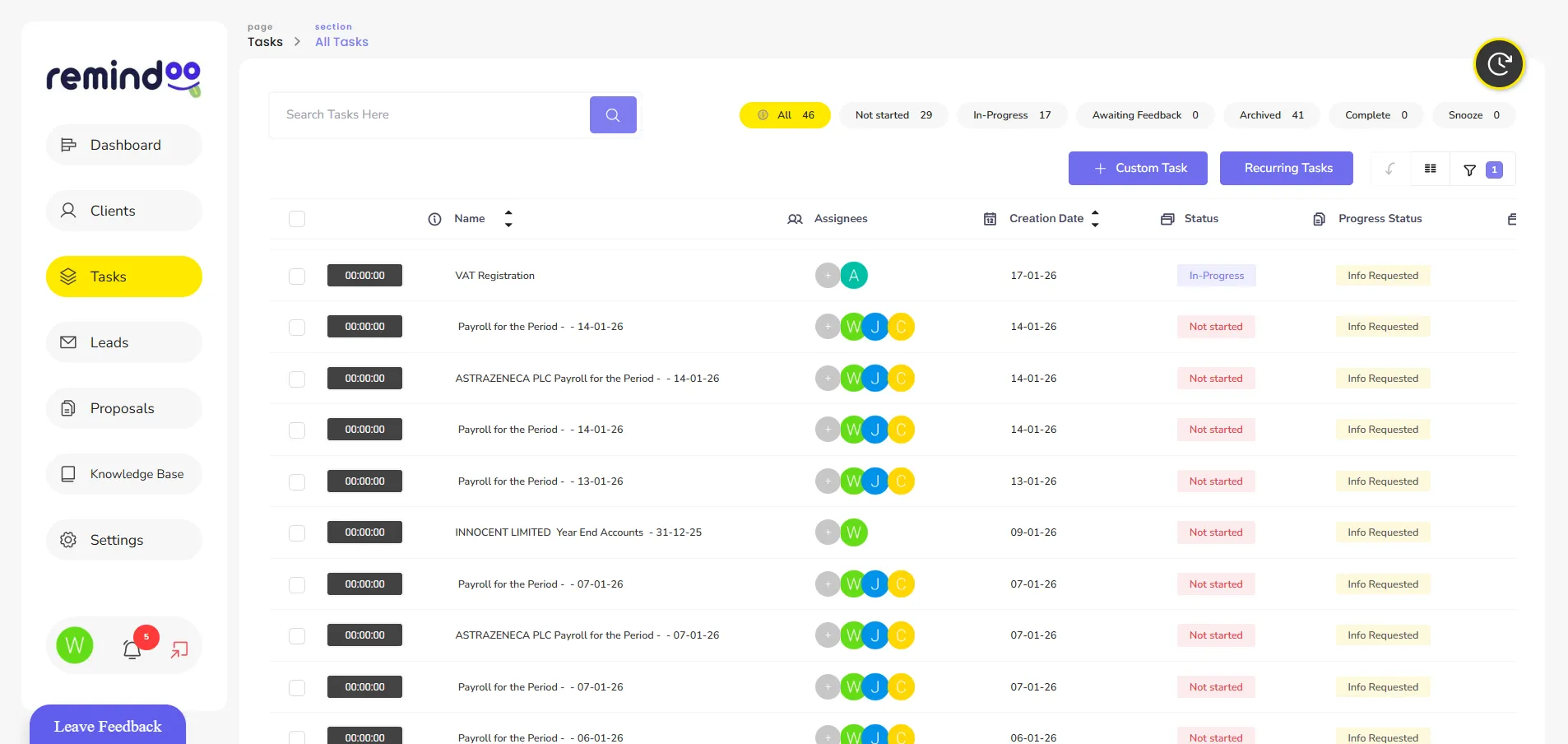
Accounting firms manage numerous responsibilities, from client communication and document collection to tax deadlines, bookkeeping and team coordination. As a practice grows, managing these activities through spreadsheets, email threads and separate applications can create unnecessary administrative work.
Cloud practice management software for accountants offers a way to bring essential practice operations into a more organised digital environment. By centralising tasks, client information and workflows, accounting firms can improve visibility, reduce repetitive work and manage deadlines more consistently.
What Is Cloud Practice Management Software?
Cloud practice management software is a digital system that allows accounting professionals to manage practice activities through internet-connected devices. Rather than relying entirely on locally stored files or separate desktop applications, authorised users can access information through a central platform.
Depending on the software, features may include client management, task allocation, workflow automation, document management, deadline tracking, reporting and client communication.
For accounting firms with multiple employees or remote team members, a centralised system can make it easier to understand which tasks require attention and who is responsible for completing them.
Why Do Accounting Firms Need Cloud-Based Systems?
Traditional practice management methods can become difficult to maintain as the number of clients, employees and deadlines increases. Information may be spread across email inboxes, spreadsheets, calendars and individual task lists.
This fragmentation can make it harder to identify overdue work, follow up with clients and distribute workloads effectively.
Cloud-based practice management can address these challenges by providing a shared view of work across the practice. Managers can review task progress, employees can understand their responsibilities, and teams can organise recurring accounting activities more consistently.
The objective is not simply to move existing paperwork online. It is to establish a more reliable way of managing everyday operations.
Key Features to Look for in Cloud Practice Management Software
1. Centralised Client Management
Accounting firms need accurate and accessible client information to manage ongoing engagements. A centralised client management system can help organise contact details, engagement information, communication records and associated tasks.
Having this information in one place can reduce the time employees spend searching through different systems.
It can also help teams maintain continuity when another employee needs to take over a client-related task or respond to an enquiry.
2. Workflow Automation
Many accounting activities follow repeatable processes. These include collecting client documents, preparing VAT returns, requesting missing information and completing year-end accounts.
Workflow automation can help firms standardise these processes by assigning tasks, setting deadlines and triggering reminders at appropriate stages.
For example, a recurring VAT workflow could include requesting records, checking documents, preparing the return, reviewing the figures and submitting the return.
Automating suitable administrative steps can reduce manual follow-ups while allowing accountants to retain control over important decisions and reviews.
3. Deadline and Task Tracking
Accounting practices must manage multiple deadlines across different clients. Missing an important date can create additional work and potentially affect a client's compliance obligations.
Cloud practice management software can help firms maintain a central schedule of tasks and deadlines. Employees can see assigned work, while managers can identify outstanding tasks and redistribute workloads when necessary.
For UK accounting firms, tracking may cover VAT returns, payroll activities, Corporation Tax, Self Assessment and Companies House filing dates, depending on the services provided.
A tracking system supports deadline management, but firms should still verify applicable deadlines and ensure that submissions are completed correctly.
4. Client Portals and Communication
Email remains useful for many accounting activities, but lengthy email chains can make it difficult to track requests and locate documents.
A client portal can provide a more structured way for clients and accounting teams to exchange information. Depending on the platform, clients may be able to upload documents, respond to requests and access relevant information.
Clear communication processes can reduce repeated requests and help clients understand what information is required.
Firms should also establish appropriate access permissions and secure document-handling procedures when using online communication tools.
5. Reporting and Workload Visibility
Practice managers need to understand how work is progressing across the team. Reporting features can help show outstanding tasks, overdue activities, workload distribution and operational trends.
This information can support more informed decisions about staffing, task allocation and process improvements.
For example, if a particular stage of the accounts preparation process regularly causes delays, managers can investigate whether the problem relates to missing documents, unclear responsibilities or limited team capacity.
How Cloud Software Can Improve Accounting Workflows
The main benefit of a connected practice management system is the ability to organise related activities within a consistent process.
Consider an accounting firm preparing monthly bookkeeping for several clients. Without a structured workflow, employees may need to check separate spreadsheets, search email threads and contact colleagues to establish which work remains outstanding.
A centralised system can organise the process into assigned tasks, deadlines and progress updates. Managers can identify delays earlier, while team members have a clearer understanding of their next responsibilities.
This approach can be particularly useful during busy periods, when several client deadlines overlap.
However, software alone will not resolve every operational problem. Firms still need clear procedures, realistic workloads and employees who understand how to use the system.
Choosing Secure Cloud Practice Management Software
Accounting firms handle confidential financial and personal information. Security should therefore be an important consideration when selecting cloud software.
Before choosing a platform, firms should review its access controls, authentication options, data backup arrangements, audit records and data export capabilities.
It is also important to understand how the provider stores and processes information, what happens when an account is closed, and whether data can be retrieved if the firm changes systems.
The UK government's guidance on securing Software as a Service (SaaS) tools explains considerations including access management, audit trails, data protection and secure migration. These principles can help accounting firms evaluate cloud software and establish appropriate controls.
Firms should assess their own legal and professional obligations before transferring confidential client information to a third-party platform.
Introducing Cloud Practice Management Software to Your Firm
Moving to a new system requires planning. Accounting firms can make the transition more manageable by following a structured implementation process.
First, identify the main operational problems the software needs to solve. These might include missed follow-ups, unclear task ownership, duplicated administration or limited visibility over deadlines.
Next, map existing workflows and identify which activities should be standardised or automated. Select a system that supports these requirements without introducing unnecessary complexity.
Before a full rollout, test the software with a small group of employees or a limited number of client workflows. Provide staff training, establish permissions and review the process before expanding its use.
Finally, measure the results. Useful indicators include overdue tasks, time spent on administration, client response times and the consistency of workflow completion.
How Remindoo Supports Accounting Practice Management
Remindoo is a practice management platform designed for accountants and bookkeepers. It brings together tools that help firms organise client-related activities, manage tasks and coordinate recurring workflows.
Its functionality includes client management, task and deadline tracking, workflow automation, proposals and anti-money laundering processes, reporting and client portal capabilities.
For firms that manage several compliance activities at once, a connected platform can help make responsibilities more visible and reduce reliance on disconnected task lists.
The value of any practice management system depends on how well its features match the firm's actual requirements. Accounting firms should assess their workflows, security needs, integrations and team processes before deciding which platform to adopt.
Conclusion
Cloud practice management software can help accounting firms organise client information, coordinate employees and manage recurring responsibilities more effectively. Centralised task tracking, workflow automation, reporting and structured client communication can all contribute to more consistent practice operations.
Successful implementation requires more than choosing software. Firms need clear processes, appropriate security controls and regular reviews of operational performance.
By selecting a platform that fits their working methods and client requirements, accounting firms can build a more organised foundation for managing existing work and supporting future growth.
Related Reading
Why Business & Finance is Transforming the Global Industry Landscape
Welcome to our in-depth exploration of Business & Finance. In an era defined...
Expert Insights: Navigating the Complex World of Business & Finance
Welcome to our in-depth exploration of Business & Finance. In an era defined...