How to Track Employee App and Website Usage Responsibly
By olive ball
4 Views
Your team uses dozens of apps and websites every working day. But do you know which tools support their work and which ones create unnecessary delays?
An employee might spend three hours using a browser. That doesn't tell you whether they were researching a project, communicating with clients or visiting unrelated websites.
This is where employee website monitoring can provide useful information.
App and website tracking helps businesses understand how employees use digital tools during working hours. However, collecting too much information or monitoring without a clear purpose can create privacy concerns and damage employee trust.
The goal shouldn't be to watch every click. It should be to understand working patterns, improve workflows and make informed decisions.
This guide explains how employee app and website monitoring works, what managers should track and how to introduce monitoring responsibly.
What Is Employee Website Monitoring?
Employee website monitoring is the process of recording and reviewing employees' website activity during work, usually through monitoring software or company-managed systems.
Depending on the technology, monitoring can show which websites employees visit, how long they spend on them and when those sites are used.
For example, a marketing manager may review whether team members spend their working hours using campaign tools, research websites and project management platforms.
However, a website visit alone cannot prove that an employee is productive or unproductive.
A person could spend 30 minutes reading industry research without interacting with the page. Another might spend the same amount of time switching between work-related websites without completing a task.
Employee website monitoring provides activity information. Managers still need context to understand what that activity means.
What Is Employee App Monitoring?
Employee app monitoring records which software applications employees use during their working time.
This may include desktop applications, collaboration tools, design software, browsers and other work-related programmes.
For example, a software development team may use:
- Visual Studio Code for programming.
- GitHub for code management.
- Slack for team communication.
- Jira for project management.
- Google Chrome for research and testing.
App monitoring can help managers understand how these tools fit into daily workflows.
When combined with website tracking, it provides a broader picture of digital activity across the working day.
How Does Employee App and Website Tracking Work?
Employee app and website tracking software generally records activity from a device, browser or managed network.
The exact information collected depends on the software, permissions and monitoring settings.
A typical system follows five steps.
1. Tracking starts
An authorised work session begins
2. App and website activity is detected
The system identifies applications and websites used
3. Usage information is recorded
Relevant activity and duration are logged according to policy
4. Reports are generated
Managers review authorised usage data and trends
5. Managers interpret the findings
Data is compared with tasks, outcomes and employee feedback
Some systems only record the application name or website domain. Others may collect detailed URLs, window titles, screenshots or additional device activity.
These differences matter because more detailed monitoring can expose private or sensitive information.
Businesses should choose the least intrusive method that meets their legitimate monitoring purpose.
What Can Employee Website Monitoring Software Track?
Different monitoring tools collect different types of information.
Employee website monitoring software helps businesses track how employees use websites and applications during working hours. Depending on the software, it can record visited websites, application usage, time spent on different platforms, active and idle periods, and overall digital activity. Some tools also provide screenshots, detailed URL tracking and usage reports. These insights help managers understand work patterns, identify workflow interruptions and review software usage. However, monitoring should focus on relevant work activities, respect employee privacy and follow clear workplace policies.
For example, a company trying to understand software licensing costs may only need aggregated app usage reports.
Collecting screenshots or detailed browsing histories would be difficult to justify for that limited purpose.
Why Do Businesses Monitor Employee Website Usage?
Responsible employee monitoring can help businesses understand how digital tools affect their work.
However, its value depends on the question managers are trying to answer.
1. Understand Digital Workflows
Employees regularly switch between applications to complete assignments.
A marketing specialist might use Google Analytics, a spreadsheet, an advertising platform and a content management system during the same task.
Website and app usage reports can help managers identify frequently used tools and understand how digital work is organised.
2. Identify Workflow Interruptions
Unusual activity patterns may suggest that employees are experiencing technical problems or unnecessary interruptions.
For example, a team might repeatedly switch between different systems to complete a simple approval.
Instead of assuming employees are distracted, managers can investigate whether the process could be improved.
3. Review Software Adoption
Businesses often pay for applications that employees rarely use.
Aggregated app usage information can help managers determine whether a particular subscription still supports the team's requirements.
This may inform software renewal decisions and training plans.
4. Support Project Planning
App usage data can provide additional context when combined with project time tracking.
For example, managers may compare recorded project hours with the digital tools commonly used during the assignment.
However, time spent in an application should not automatically be treated as time spent completing a particular project.
5. Investigate Security Concerns
Website monitoring may help businesses identify unusual access patterns or possible violations of established acceptable-use policies.
Where security is the purpose, businesses should use proportionate security controls rather than collecting unnecessary employee activity information.
How to Track Employee App and Website Usage Responsibly
Introducing monitoring software is only one part of the process.
Managers also need clear objectives, fair policies and a reliable way to interpret activity information.
Step 1: Define a Legitimate Monitoring Purpose
Before collecting any activity data, identify the business problem you're trying to solve.
Are you trying to understand software usage? Improve project planning? Identify workflow problems? Protect company systems?
Each purpose may require a different level of monitoring.
For example, reviewing whether employees use expensive software licences may only require aggregated application usage statistics.
It may not require recording every website visited by individual employees.
The UK's Information Commissioner's Office (ICO) advises employers to define the purpose of monitoring and use the least intrusive means appropriate to that purpose.
Step 2: Explain the Monitoring Policy to Employees
Employees should understand what information is collected and why.
Before introducing monitoring, explain the scope in straightforward language.
A workplace monitoring policy should cover:
- Which applications and websites are tracked.
- When monitoring starts and stops.
- Whether personal browsing is excluded.
- Why the information is collected.
- Who can access employee activity reports.
- How long information is retained.
- How employees can raise concerns or correct inaccurate records.
The UK's workplace advisory body, Acas, recommends consulting employees and their representatives before introducing monitoring arrangements.
Open communication can help managers identify practical issues and reduce uncertainty.
Step 3: Choose an Appropriate Monitoring Method
Different monitoring methods offer different levels of visibility.
Method
What It Measures
Main Consideration
App usage reports
Applications used and their activity duration
Usually less detailed than screen capture
Domain-level website tracking
Websites or domains accessed
May still reveal sensitive interests
Detailed URL tracking
Specific pages visited
Greater privacy risk
Screenshot monitoring
Visual content displayed on a device
Can capture private or confidential information
Network security logs
Website or service connections
Should be restricted to defined security purposes
Choose a monitoring method that matches the problem you need to solve.
If aggregated application data is enough, collecting detailed browsing histories may be unnecessary.
Step 4: Configure Monitoring Around Working Hours
Monitoring should have a clearly defined scope.
For many workplaces, this means limiting employee activity monitoring to authorised work sessions and avoiding personal activity.
This is particularly important for remote employees who use personal devices or share workspaces with family members.
For example, an employee who finishes work at 5 PM should not have their unrelated evening browsing collected merely because they previously used their device for work.
Organisations should establish technical safeguards and operating rules that separate business monitoring from personal use wherever possible.
Step 5: Categorise Applications Carefully
Some monitoring systems allow businesses to classify applications or websites by category.
These categories should be treated as context-dependent rather than definitive productivity ratings.
A marketing employee researching video trends on YouTube may be doing valuable work. Another employee could leave a recognised work application open without completing an assignment.
Managers should allow for exceptions and review classification rules regularly.
Step 6: Analyse Usage Patterns Alongside Work Outcomes
App usage data becomes more useful when managers connect it with actual workplace results.
For example, suppose a designer spends five hours using Figma.
That information is more meaningful when the manager also knows whether the assigned designs were completed, whether revisions were required and whether deadlines were met.
Managers should compare usage trends with:
- Completed tasks and deliverables.
- Project deadlines.
- Work quality.
- Reported technical issues.
- Employee feedback.
- Team workload.
A high activity percentage is not proof of strong performance.
Likewise, an extended period without detected computer input is not proof that an employee has stopped working.
Step 7: Restrict Access to Monitoring Data
Not everyone in a business needs access to individual browsing histories.
Managers should only receive the information necessary for their responsibilities.
For example, an HR manager might need a summary of relevant working-time information, while a project manager may only need aggregated activity trends for their team.
Role-based access, secure storage and clear retention rules help reduce unnecessary exposure of employee information.
Step 8: Review and Improve the Monitoring Process
Monitoring policies should not remain unchanged indefinitely.
Managers should periodically ask whether the information collected is still necessary and useful.
For example, a business that initially introduced website monitoring to understand software adoption may no longer need the same level of data collection after completing that review.
Regular assessments can help organisations reduce unnecessary monitoring and maintain employee trust.
Employee App Monitoring vs Website Monitoring: What's the Difference?
Although these methods are closely related, they focus on different aspects of digital work.
App monitoring tracks the software employees use, while website monitoring focuses on their activity in web browsers.
Feature
App Monitoring
Website Monitoring
Primary focus
Software application usage
Browsing and website usage
Example
Time spent in Excel
Time spent on Google Sheets
Typical data
App names and usage duration
Domains, URLs and visit duration
Main benefit
Understand software adoption
Understand web-based workflows
Common users
IT teams, operations managers
Team managers, IT and security teams
Privacy concern
May reveal sensitive app usage
May reveal private browsing interests
For businesses using desktop and web-based software, combining both methods may provide broader visibility.
However, combining monitoring methods also increases the volume of personal information collected. Employers should assess whether that additional collection is necessary.
Real-Life Example: Monitoring a Remote Marketing Team
Imagine a marketing agency with six remote employees.
The team uses several applications for content creation, research, communication and campaign management.
The manager wants to understand why projects regularly exceed their estimated working hours.
Rather than introducing constant screen surveillance, the company reviews work-related app and website usage alongside project time records.
These records show where the employee's detected digital activity was distributed.
But they don't establish whether seven hours of valuable work were completed.
The manager also reviews assigned tasks and project deadlines. They discover that employees frequently switch between communication tools while waiting for content approvals.
Instead of treating the app usage report as a productivity ranking, the manager improves the approval process.
This is a more constructive use of employee monitoring data.
Is Employee Website Monitoring Legal?
Employee website monitoring can be lawful in the UK, but employers must comply with applicable data protection and employment law.
The ICO's guidance on monitoring workers explains that organisations must ensure monitoring is lawful, fair, transparent, necessary and proportionate.
UK GDPR and Employee Monitoring
Where monitoring involves personal data, employers need to identify an appropriate lawful basis under the UK GDPR.
Legitimate interests may be appropriate in some circumstances, but employers must assess necessity and balance their interests against employees' rights. It is not an automatic justification.
Employee consent can also be problematic as a lawful basis because the employer-employee relationship may prevent consent from being freely given.
Data Protection Impact Assessments
A Data Protection Impact Assessment (DPIA) helps organisations identify and reduce privacy risks before introducing monitoring.
A DPIA is required when processing is likely to result in a high risk to individuals' rights and freedoms.
Even where one is not mandatory, the ICO recommends using the DPIA process to assess monitoring risks.
Monitoring Personal Devices
Employers should take particular care when employees use their own devices.
Personal browsing, private conversations and information about other household members should not be captured unnecessarily.
A company should consider whether monitoring can be limited to managed work environments instead.
Employee Privacy Rights
Employees retain privacy and data protection rights at work, including when working remotely.
Businesses should provide meaningful information about monitoring, use appropriate safeguards and allow employees to exercise their applicable data protection rights.
For further guidance, read the ICO guidance on data protection and monitoring workers.
This section provides general information, not legal advice. Requirements vary by jurisdiction and monitoring arrangement.
Best Practices for Responsible Employee Website Monitoring
Responsible monitoring requires more than installing software. It involves decisions about the information collected, the people who can access it and how findings are used.
Here are eight practical principles managers should follow.
Responsible monitoring checklist
Use this checklist to assess your organisation's monitoring arrangements before introducing or expanding tracking.
Preparation completed
0 of 8
Define a specific, documented business purpose
Consult employees and explain the monitoring policy
Identify a lawful basis and assess privacy risks
Collect only the information genuinely needed
Exclude private activity wherever possible
Restrict access and establish retention periods
Review activity alongside work outcomes and context
Reassess the monitoring process regularly
Completing this checklist does not itself establish legal compliance, but it provides a useful starting point for reviewing a proposed monitoring system.
Common Employee Monitoring Mistakes to Avoid
Monitoring Without Explaining Why
Employees may become concerned if they discover that their browsing activity is being recorded without a clear explanation.
Managers should communicate the monitoring purpose and scope before introducing it, except in very limited circumstances where lawful covert monitoring is justified.
Treating All Non-Work Websites as Distractions
A website's category doesn't always explain why an employee visited it.
For example, a recruiter may use social media for candidate research. A marketing professional may watch videos to analyse competitors.
Managers should consider job responsibilities before judging website activity.
Collecting More Information Than Necessary
Detailed URL histories, screenshots and other sensitive activity records can increase privacy risks.
If a business only needs to understand how much a software tool is used, collecting browsing content may be excessive.
Using Activity Data as the Only Performance Metric
Computer activity does not measure creativity, problem-solving, customer satisfaction or work quality.
Managers should assess employee performance using relevant outcomes rather than relying exclusively on digital activity reports.
Ignoring Employee Feedback
An employee may have a reasonable explanation for an unusual usage pattern.
For example, they may have been researching a customer issue, troubleshooting software or completing training.
Discussing the findings can help prevent inaccurate conclusions.
How Staff Time Tracker Supports App and Website Monitoring
Managers often need a way to understand digital work patterns without switching between several disconnected tools.
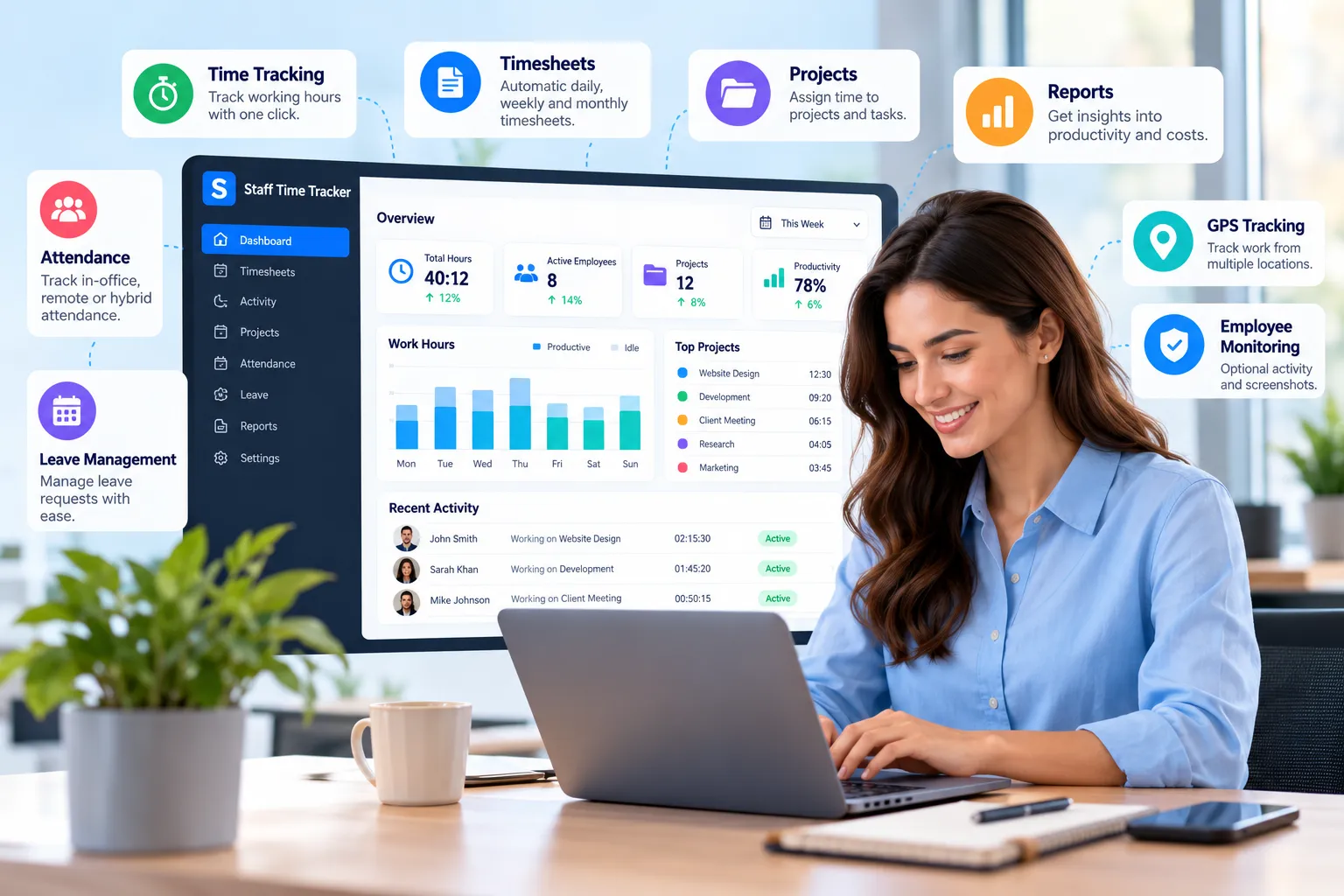
Staff Time Tracker combines app and URL monitoring with time tracking, employee activity records and workforce reporting.
According to its published features, the platform supports app and website usage tracking, productivity insights, configurable activity monitoring and optional screenshots.
Review Application and Website Usage
Staff Time Tracker provides visibility into applications and websites used during tracked working time.
These records can help managers understand digital workflows and identify usage patterns that warrant further review.
Combine Usage Data With Time Records
App and website activity can be reviewed alongside employee time tracking records.
This helps managers consider how digital activity relates to recorded work sessions rather than relying on isolated usage figures.
Understand Inactivity Patterns
The platform also includes idle time tracking.
Managers can identify periods without detected input and investigate whether those periods relate to offline work, technical interruptions or other circumstances.
Access Workforce Analytics
Through workforce analytics, businesses can review time records, activity patterns and broader workforce information.
These reports can help managers identify recurring issues and make more informed operational decisions.
Configure Monitoring to Match Team Policies
Staff Time Tracker describes flexible monitoring settings, including adjustable activity tracking and optional screenshots.
Organisations should select settings that match their legitimate business purposes and data protection responsibilities.
The technology provides monitoring capabilities, but employers remain responsible for using them lawfully and fairly.
Explore Staff Time Tracker's app and URL tracking features to learn how the platform supports digital workplace visibility.
Frequently Asked Questions
1. What is employee website monitoring?
Employee website monitoring is the process of recording and reviewing employees' website usage during work. Depending on the software, employers may see visited domains, activity duration and usage patterns. Responsible monitoring should have a clear purpose and appropriate privacy safeguards.
2. Can employers track websites employees visit?
Yes, employers may be able to track websites visited on managed devices or networks. However, they must comply with applicable laws, establish a legitimate purpose and provide appropriate information about monitoring. The level of tracking should be necessary and proportionate.
3. Can employee monitoring software track applications?
Yes. Many employee monitoring platforms record application usage, including software names and activity duration. Managers can use this information to understand digital workflows and review which applications support daily work.
4. Is employee website monitoring legal in the UK?
Employee website monitoring can be legal in the UK when it complies with data protection and employment requirements. Employers must identify an appropriate lawful basis, provide transparency and avoid unnecessary or disproportionate monitoring.
5. Can employers monitor employees working from home?
Yes, employers may monitor remote employees for legitimate purposes, subject to applicable legal requirements. However, monitoring should respect employees' privacy, particularly when they use personal devices or work from home.
6. Does website monitoring measure employee productivity?
Website monitoring provides information about browsing activity, not a complete measurement of productivity. Managers should consider completed tasks, project outcomes, work quality and employee feedback before evaluating performance.
7. What is the difference between app tracking and URL tracking?
App tracking records which software applications employees use. URL tracking focuses on websites or web pages accessed through browsers. Both can help managers understand digital activity, but they collect different types of information.
8. How can businesses monitor website usage without micromanaging employees?
Businesses can focus on aggregated trends, use limited monitoring settings, explain their policies and review activity alongside work outcomes. Managers should avoid unnecessary data collection and give employees opportunities to explain unusual patterns.
Final Thoughts
Employee website monitoring can help businesses understand digital workflows, review software usage and identify operational problems.
However, more data doesn't automatically lead to better management.
An employee who spends hours using work applications isn't necessarily productive. Similarly, someone visiting a research website or spending time away from their keyboard isn't automatically wasting time.